Succeeding academically is as much about the natural ability to learn the designated material as it is about time, ability to learn how the professor thinks (read – what is important to them and therefore will be on the exam), and general luck. Some professors lecture extensively on topics that will never be touched on an exam while others simply summarize readings during lecture. Learning the style can be difficult and overwhelming at times, especially when you are learning a whole new set of professors’ expectations, styles, and workload every single semester. What I have found that has really helped me in being able to succeed academically but also be realistic about my ability to get that A, would be the Grades app.
After the first week of school, when I have all my syllabi, I copy all of the components into the app:
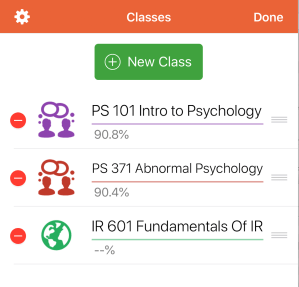
1. Create a Class – As part of my degree program, I take graduate courses within the Pardee School of Global Studies, where I am a masters student pursuing a degree in International Affairs with a Specialization in Security Studies. I also take psychology courses within the College of Arts and Sciences at Boston University. To easily be able to designate the classes, I use icons (people talking for psychology and the globe for international affairs).
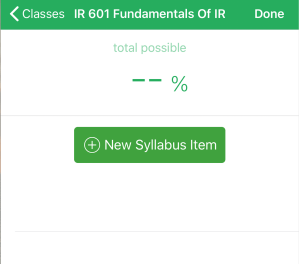 2. Add-In Syllabus Items – This semester, I am enrolled in two classes including IR 601 Fundamentals of International Relations. One the first day of classes (or via blackboard), I add in all of the syllabus items, how much they are worth, and my designated percentage grade.
Why I like this app and why I am recommending it to you:
- School is stressful and so is managing expectations of multiple professors. I have found that this app allows me to realistically track each grading component throughout the class so that I can get an idea of where I stand at each moment.
- Exams generate a lot of stress and I enjoy walking into an exam with the knowledge of my grades on previous exams as well as how it will factor into the course overall if I either: continue along the current grading trend, excel on the next exam, or do poorly in comparison to my previous scores. For me, sometimes walking into an exam and not knowing some of the answers can psych me out but the grades app helps remind me that I have more wiggle room when looking at my end goal.
- The app helps you prioritize assignments. Seeing how much each assignment is worth and how well you are doing in each class can help you decide whose office hours you should go to first and which study groups you may want to dedicate more time to. When I write down all the assignments that I have to complete throughout every week, they all look of equal importance. This app helps remind me that some things deserve or require more attention than others.
Looking for other tips toward academic success? Check out my post on creating a graduate course spreadsheet and the top five products to keep your fall semester productive!
 The Balanced Academic